Updating Your Server to Address CVE-2026-98432
Step 1. Remove the old Xray installation
The server will be unavailable to all users during the reboot. Following steps 1–3 below will invalidate existing Xray connections for everyone using the server. The server owner will need to share access again.
Before updating the system, remove the old Xray installation through the app:
- Open AmneziaVPN on a device with full access to the server.
- Click ⚙️ (gear icon) → Servers, then select your server.
- Open the Protocols tab, select Xray, click Remove, and confirm.
Step 2. Update the system and reboot the server
Fixing the vulnerability requires a patched Linux kernel.
You can update the system and reboot the server through the AmneziaVPN app:
The Update server packages option was introduced in AmneziaVPN 5.1.0.6. If you have an earlier version of the app, download and install the latest version from GitHub or the downloads page (mirror).
-
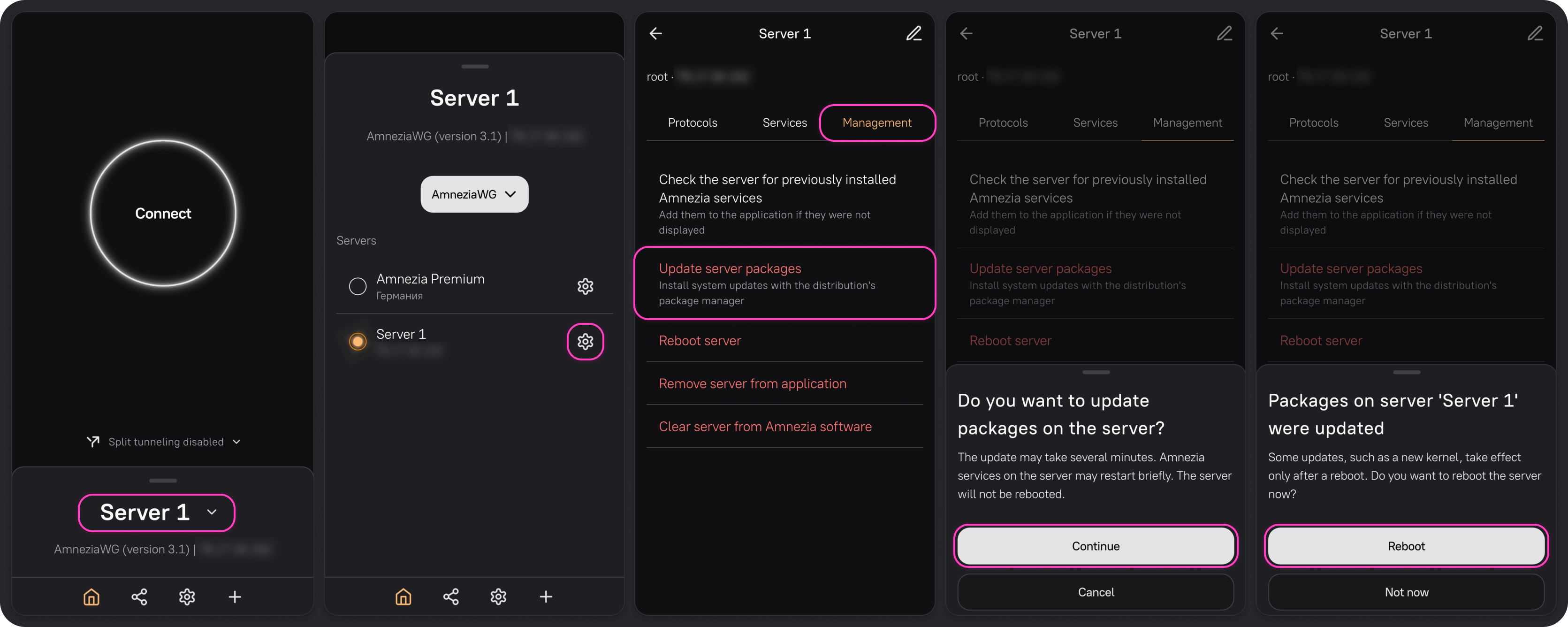
On the home screen, click the server name, then click ⚙️ (gear icon) next to the server you want to update.
-
Open the Management tab and click Update server packages.
This updates the system packages, similar to running
sudo apt update && sudo apt dist-upgrade -yon Ubuntu. -
Click Continue and wait for confirmation that the packages have been updated.
-
Once the update is complete, the app will prompt you to reboot the server. Click Reboot and wait for the server to come back online. A reboot is required for the server to use the updated kernel.
The Update server packages button installs updates from the repositories configured on your server, but does not guarantee that a kernel containing the fix will be installed.
On some versions of Ubuntu, the fix is currently available only in the -proposed testing repository and is not included in a standard system update. See Canonical's advisory for details.
If you use a different distribution, check its official security advisories to find out whether a fix for CVE-2026-98432 is available for your system version and how to install it.
Step 3. Install the updated Xray
Installing the updated Xray requires AmneziaVPN 5.1.0.6 or later. If you have an earlier version of the app, download and install the latest version from GitHub or the downloads page (mirror). Then reinstall Xray on your server using the steps below.
- Open the updated AmneziaVPN app.
- Go to Settings → Servers, select your server, and open the Protocols tab.
- Select Xray, click Install, and wait for the installation to finish.
- Connect to the VPN and share access with the other server users again.
If you reboot the server again after completing this guide, reinstall the Xray container by repeating steps 1 and 3. Each subsequent reboot leaves the server vulnerable to CVE-2026-98432 again until you reinstall the container. This behavior will be fixed in a future AmneziaVPN release.
